 |
 |
New Products
Low cost PLCs
Window CE PLCs
PLC Trainers
Pre-Wired Control Panels
Analog Modules
Operator Panels
Control and Monitoring thru Excel
SCADAs
|
Power Supplies Relays Position Transducers RS232/Ethernet Converter Wireless Modem Power monitoring Protection Devices Marquees |
Variable Frequency Drives
Industrial Computer
Encoders
Application Proyects
Combos
Tech Support
Downloads |
Who are we? Our customers FAQ's How to order Contact Us Home |
|||||
| Latin-Tech Inc. |
||||||||||
1-888-832-7568 Toll free 305-207-0076 Tel 1-775-637-6825 Fax |
||||||||||
| Super
PLCs T100 Series |
||||||||||||||||||||||||||||||||||||||||||||||||||||||||||||||||||||||||||||||||||||||||||||||||||||||||||||||||||||||||||||||||||||||||||||||||||||||||||||||||||||||||||||||
|
All
what you wanted to have on a PLC.... at incredible price! |
||||||||||||||||||||||||||||||||||||||||||||||||||||||||||||||||||||||||||||||||||||||||||||||||||||||||||||||||||||||||||||||||||||||||||||||||||||||||||||||||||||||||||||||
| All the T100 series include:
|
Hence they are all HMI and SCADA-ready, and they can be easily integrated with other factory automation systems. |
|||||||||||||||||||||||||||||||||||||||||||||||||||||||||||||||||||||||||||||||||||||||||||||||||||||||||||||||||||||||||||||||||||||||||||||||||||||||||||||||||||||||||||||
 |
||||||||||||||||||||||||||||||||||||||||||||||||||||||||||||||||||||||||||||||||||||||||||||||||||||||||||||||||||||||||||||||||||||||||||||||||||||||||||||||||||||||||||||||
T100MD
series |
||||||||||||||||||||||||||||||||||||||||||||||||||||||||||||||||||||||||||||||||||||||||||||||||||||||||||||||||||||||||||||||||||||||||||||||||||||||||||||||||||||||||||||||
| T100MD2424+ | ||||||||||||||||||||||||||||||||||||||||||||||||||||||||||||||||||||||||||||||||||||||||||||||||||||||||||||||||||||||||||||||||||||||||||||||||||||||||||||||||||||||||||||||
| 8
Analog I/O
6 x AD -10 bit, 0-5V 2 x DA - 8 bits, 0-5V 24
Digital Outputs 24
Digital Inputs (24V NPN) US 323 |
||||||||||||||||||||||||||||||||||||||||||||||||||||||||||||||||||||||||||||||||||||||||||||||||||||||||||||||||||||||||||||||||||||||||||||||||||||||||||||||||||||||||||||||
| Starter kit US 407 | ||||||||||||||||||||||||||||||||||||||||||||||||||||||||||||||||||||||||||||||||||||||||||||||||||||||||||||||||||||||||||||||||||||||||||||||||||||||||||||||||||||||||||||||
| Why SUPER PLCs? | ||||||||||||||||||||||||||||||||||||||||||||||||||||||||||||||||||||||||||||||||||||||||||||||||||||||||||||||||||||||||||||||||||||||||||||||||||||||||||||||||||||||||||||||
| Very fast program development cycle You will discover how incredibly fast and easy you can complete a relatively complex programming job using the Ladder+BASIC language. With the escalating cost of programmers today, shorter development time means greater cost saving for companies. |
Extremely easy to learn Our TRiLOGI software, with its built-in real time simulation capability, is used by many colleges to train students in PLC programming. (Click on "Downloads" tab to get the software for free) It often takes less than half an hour to learn to create your own ladder logic program and run a simulation test on your own PC. You can fully evaluate the capability and ease of use of our PLCs with absolutely no risk! |
Powerful You get built-in analog I/Os, LCD port, PWM, stepper motor controllers, interrupts, encoder inputs, pulse frequency measurement, real time clock, RS232 ports, RS485 networking port, PID and more! Each Super PLC incorporates an arsenal of built-in hardware that only exists as expensive add-on options on most other PLC-brands. In addition, the built-in BASIC commands greatly simplify the use of these hardware. |
||||||||||||||||||||||||||||||||||||||||||||||||||||||||||||||||||||||||||||||||||||||||||||||||||||||||||||||||||||||||||||||||||||||||||||||||||||||||||||||||||||||||||||
| TCP/IP Super PLC users are the first ones to be able to remotely program and control their PLCs via the INTERNET using an Internet Explorer or Netscape browser found in any PC. Such capability allows OEMs to remotely troubleshoot or upgrade software for their equipment without spending a fortune to travel to far away locations. . |
Dynamic Data Exchange Super PLC users are also able to collect data remotely via the Internet or via the corporate LAN and have the data stored in Excel Spreadsheet for analysis or charting (requires TRi-ExcelLink software). You can also create your own PLC control GUI applet very easily. |
Low Cost The Super PLCs are designed to be embedded into cost-sensitive OEM applications, hence their prices are kept low so much so that some users who are used to paying big bucks for other PLC brands actually thought that it is unreal! You owe it to yourself to discover how the Super PLCs can actually enhance your product capability while helping you save cost at the same time! |
||||||||||||||||||||||||||||||||||||||||||||||||||||||||||||||||||||||||||||||||||||||||||||||||||||||||||||||||||||||||||||||||||||||||||||||||||||||||||||||||||||||||||||
| What
about the Programming Software? |
||||||||||||||||||||||||||||||||||||||||||||||||||||||||||||||||||||||||||||||||||||||||||||||||||||||||||||||||||||||||||||||||||||||||||||||||||||||||||||||||||||||||||||||
| Most PLCs in the industry are programmed by a highly specialized, well-established programming language called "Ladder Logic". Ladder Logic programming has its strength in handling single bit digital I/O programming, but it is at best an awkward language for data processing where numerical data needs to be manipulated. Have you tried to develop a communication program, initializing an analog module or tried to develop a non included protocol or function in your current PLC? This is the case when you will value our PLCs On the other hand, desktop computers are typically programmed by high-level languages such as BASIC, C, PASCAL, C++, Java etc. These powerful programming languages are designed for data processing, but they are not oriented towards flipping single bit digital I/Os. By combining these two most important branches of programming languages into one single, seamless entity, we had invented the industry first "Ladder + BASIC" language that can easily handle sophisticated tasks with just a few lines of codes. We have also developed a family of M-series Super PLCs that are exclusively programmed in Ladder + BASIC language, using our highly acclaimed TRiLOGI PLC programming Editor, Compiler and Simulator software. |
||||||||||||||||||||||||||||||||||||||||||||||||||||||||||||||||||||||||||||||||||||||||||||||||||||||||||||||||||||||||||||||||||||||||||||||||||||||||||||||||||||||||||||||
| Take a look to our software | ||||||||||||||||||||||||||||||||||||||||||||||||||||||||||||||||||||||||||||||||||||||||||||||||||||||||||||||||||||||||||||||||||||||||||||||||||||||||||||||||||||||||||||||
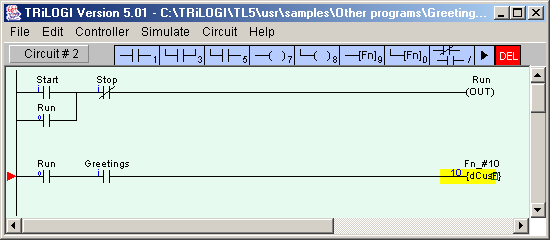 |
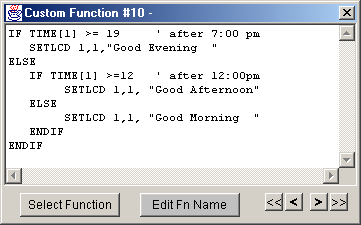
As you can see, part of the program can be written in Ladder, using normal open and close contacts. Be aware, this complex program will take only TWO lines since the important tasks can be developed in BASIC language. The Function #10 ( written in TBASIC) is a "differentiated" function which means that will be executed only once when triggered |
|||||||||||||||||||||||||||||||||||||||||||||||||||||||||||||||||||||||||||||||||||||||||||||||||||||||||||||||||||||||||||||||||||||||||||||||||||||||||||||||||||||||||||||
If
we take a close look to the Function #10 we will see that it's a simple
program in TBASIC |
||||||||||||||||||||||||||||||||||||||||||||||||||||||||||||||||||||||||||||||||||||||||||||||||||||||||||||||||||||||||||||||||||||||||||||||||||||||||||||||||||||||||||||||
| When you press "Start" and then the button "Greetings" , your PLC will greet you either "Good Morning", "Good Afternoon" or "Good Evening" on its LCD display ( Could be our U$35 MDLCD216 display) depending on the time of the day. Note: You only need to use the TBASIC language as and when needed as demonstrated in this case. Otherwise, the PLC will happily execute standard ladder logic circuit based on AND, OR, NOT, timers, counters only! |
 |
|||||||||||||||||||||||||||||||||||||||||||||||||||||||||||||||||||||||||||||||||||||||||||||||||||||||||||||||||||||||||||||||||||||||||||||||||||||||||||||||||||||||||||||
| TBASIC includes a powerful set of control instructions, that allow easy solution for complex programming tasks. |
||||||||||||||||||||||||||||||||||||||||||||||||||||||||||||||||||||||||||||||||||||||||||||||||||||||||||||||||||||||||||||||||||||||||||||||||||||||||||||||||||||||||||||||
Some
examples of our powerful programming |
||||||||||||||||||||||||||||||||||||||||||||||||||||||||||||||||||||||||||||||||||||||||||||||||||||||||||||||||||||||||||||||||||||||||||||||||||||||||||||||||||||||||||||||
| SETLCD
2,1, " Room Temp=" + ADC(2)*50/4095 + CHR$(223) + "C" |
||||||||||||||||||||||||||||||||||||||||||||||||||||||||||||||||||||||||||||||||||||||||||||||||||||||||||||||||||||||||||||||||||||||||||||||||||||||||||||||||||||||||||||||
| In one single function we would get the analog value of a sensor , connected to the Analog Port 2, do the mathematics and conversion of this 0- 5VDC voltage into a normal temperature range and then show it in Row 2,Column 1 on the LCD Display. You will obtain: Room Temp= XX ºC Could you imagine, just one line to do it all! |
||||||||||||||||||||||||||||||||||||||||||||||||||||||||||||||||||||||||||||||||||||||||||||||||||||||||||||||||||||||||||||||||||||||||||||||||||||||||||||||||||||||||||||||
| TOGGLEIO
OUTPUT5 |
||||||||||||||||||||||||||||||||||||||||||||||||||||||||||||||||||||||||||||||||||||||||||||||||||||||||||||||||||||||||||||||||||||||||||||||||||||||||||||||||||||||||||||||
| When you use the TOGGLEIO instruction triggered by an input contact, the specified output ( in this case output 5 ) will alternate its state. If it was ON will be turned OFF and viceversa. In other words, every time you press a buttons connected at a single input you can turn on or off an output. No need for separate START- STOP buttons Have you tried to do this using other programming techniques as ladder, RLL Plus or Stage programming? This require a lot of programming knowledge |
||||||||||||||||||||||||||||||||||||||||||||||||||||||||||||||||||||||||||||||||||||||||||||||||||||||||||||||||||||||||||||||||||||||||||||||||||||||||||||||||||||||||||||||
| FOR I=0 TO 5 DM[I]=READMODBUS(13,8,16+I) NEXT I |
||||||||||||||||||||||||||||||||||||||||||||||||||||||||||||||||||||||||||||||||||||||||||||||||||||||||||||||||||||||||||||||||||||||||||||||||||||||||||||||||||||||||||||||
| MODBUS RTU is a non easy communication issue when related to most of the PLCs. With our SuperPLC T100 series and the TBASIC, this is a quite easy work. In the above example the registers from 16 to 21 will be read from the SLAVE 8, thru port #3 on the PLC and stored in memory from DM[0] up to DM[5]. For MODBUS ASCII just change 13 by 3. MODBUS Protocol couldn't be easier! By the way, did you know that both ports in our PLCs can talk several protocols different and simultaneously? Even more, with TBASIC you can write any protocol you need or want |
||||||||||||||||||||||||||||||||||||||||||||||||||||||||||||||||||||||||||||||||||||||||||||||||||||||||||||||||||||||||||||||||||||||||||||||||||||||||||||||||||||||||||||||
| STEPSPEED 1,5000,100 STEPMOVE 1, 100000,20 | ||||||||||||||||||||||||||||||||||||||||||||||||||||||||||||||||||||||||||||||||||||||||||||||||||||||||||||||||||||||||||||||||||||||||||||||||||||||||||||||||||||||||||||||
| Incredible for those who work motion control with PLCs! Just two instructions to define motion profiles on Stepper motors or Servo drives. The first instruction configures channel 1 to a maximum speed of 5000pps, taking 100 steps to reach the full speed. The stepper motor is programmed to rotate 100000 pulses and when completed the relay 20 is turned on. Hey, our PLCs are the only ones with Two motion channels included in starting prices of just
|
||||||||||||||||||||||||||||||||||||||||||||||||||||||||||||||||||||||||||||||||||||||||||||||||||||||||||||||||||||||||||||||||||||||||||||||||||||||||||||||||||||||||||||||
We welcome any technical institutes and colleges to use the TRiLOGI software and PLC Trainers to train students on ladder logic programming at no charge at all! We would appreciate it if you could email to us at: sales@latin-tech.net to inform us that you will be providing a link to our website at: www.lt-automation.com so that the students can download the TRiLOGI software from our web page to do their homework! Suggestions and feedback on our products would be greatly appreciated. Please tell your friends and colleagues about the program if you enjoy using it.
|
PLC Training Course Instructor Comments: "I use TRiLOGI in the college classroom. I have each student download and install TRiLOGI on their home computer, and I then give them programming assignments to do at home. They individually write, run and debug their PLC programs, and then email their program files to me for testing and grading. Since TRiLOGI will simulate PLC operation off-line, each student is able to obtain hands-on programming and debugging experience without having to wait for their turn on an expensive laboratory PLC. The students enjoy using TRiLOGI because they can see their programs run at home without loading them into an actual PLC, it is easy to learn, and the cost for the off-line version is zero." Prof John Hackworth, Old Dominion University |
|||||||||||||||||||||||||||||||||||||||||||||||||||||||||||||||||||||||||||||||||||||||||||||||||||||||||||||||||||||||||||||||||||||||||||||||||||||||||||||||||||||||||||||
|
||||||||||||||||||||||||||||||||||||||||||||||||||||||||||||||||||||||||||||||||||||||||||||||||||||||||||||||||||||||||||||||||||||||||||||||||||||||||||||||||||||||||||||||
| For pricing, questions and/or ordering please Contact us | ||||||||||||||||||||||||||||||||||||||||||||||||||||||||||||||||||||||||||||||||||||||||||||||||||||||||||||||||||||||||||||||||||||||||||||||||||||||||||||||||||||||||||||||
© LATIN TECH 2005 |
||||||||||||||||||||||||||||||||||||||||||||||||||||||||||||||||||||||||||||||||||||||||||||||||||||||||||||||||||||||||||||||||||||||||||||||||||||||||||||||||||||||||||||||